The best in-app feedback tool is the one that fits how you want to hear from users. Judge each option on three things: whether it reaches the right user at the right moment, whether it handles feature requests or only short surveys, and what it costs as your user base grows. Koala Feedback suits teams that want votes, requests, and a public roadmap. Formbricks suits developers who want open source. Userpilot suits growth teams. Amplitude suits teams already using its analytics. Qualaroo suits quick micro-surveys.
Most teams start with a support inbox, a few Slack messages, and a spreadsheet nobody trusts. In-app feedback collection fixes that by catching opinions while people are inside your product, not weeks later in an email. The catch is that the tools fall into two camps, feedback portals and survey widgets, and a feature list alone will not tell you which camp you need.
Below are five options, each checked the same way: how it collects feedback, who it suits, and what it costs. Pricing changes often, so confirm current numbers on each vendor's pricing page before you buy.
Koala Feedback is the pick if your core question is "what should we build next?" It centralizes requests, votes, and roadmap updates in one place.

Koala Feedback is a hosted feedback portal where users submit ideas, vote, and comment. It is not a pop-up survey widget. You link to it from inside your app, for example from a help menu or settings page, so it works as a simple feedback collection app for feature requests.
It fits product managers and SaaS teams that want ranked, vote-backed requests instead of scattered messages. Portals can be up and running in minutes, and a custom domain takes a few more. If you also need in-context NPS pop-ups, pair it with a survey tool from this list.
Signing up is free, and all plans are billed annually.
| Plan | Price | Boards | Statuses | Admins | Active posts |
|---|---|---|---|---|---|
| Starter | Free | 3 | 5 | 1 | 100 |
| Growth | $29/month | Unlimited | 6 | 5 | Unlimited |
| Business | $89/month | Unlimited | Unlimited | 5 | Unlimited |
The Starter plan includes unlimited users.
Use a portal to learn what users want built, and a survey tool to learn how they feel right now.
Formbricks is the best choice for engineering-led teams that want control over their data and their feedback stack.
Formbricks is an open-source survey platform that runs in-app surveys inside web and mobile products. You trigger a survey from an event or a user attribute, so a question can appear right after someone finishes a task.
It suits developers and product teams that want to self-host for privacy reasons or customize the setup. Expect to involve an engineer during installation. Non-technical teams may prefer a fully no-code tool.
The code is open source, so self-hosting is free apart from your own infrastructure. The hosted cloud version has a free tier and paid tiers above it. Check the vendor's page for the current limits.
If you have engineers and care about owning your data, open source gives you the most control per dollar.
Userpilot is the best fit when feedback is one part of a broader product growth program.
Userpilot is a no-code product adoption platform. You build in-app surveys such as NPS, CSAT, and CES next to tooltips, checklists, and onboarding flows. You can target surveys by user segment and behavior, so a question reaches only the people who used a given feature.
It suits product-led growth teams that want to run onboarding and feedback from one tool without waiting on developers. It is more than you need if all you want is a single survey.
Userpilot is sold through paid plans without a permanent free tier, and pricing is aimed at funded teams. Request a quote or check its pricing page for the current figures.
Choose Userpilot when onboarding, adoption, and feedback all need to live in one no-code tool.
Amplitude is the strongest option if your team already analyzes behavior there and wants feedback tied to those numbers.
The Guides and Surveys feature lets teams build no-code, targeted in-app surveys and guides that appear when users are more likely to respond. Responses sit beside your event data, so you can compare what people say with what they actually do.
It suits data-driven product teams already on Amplitude. If you have no analytics setup, you would adopt a whole platform just to get surveys.
Amplitude offers a free starter plan, with paid tiers above it. The limits for Guides and Surveys depend on your plan, so confirm them on the vendor's pricing page.
Feedback is most useful when you can set it next to the behavior that explains it.
Qualaroo is built for short, targeted questions rather than full feedback management.
Qualaroo delivers contextual micro-surveys inside your product and on your website. It targets by page, behavior, or user traits, and it uses AI to help analyze open-ended answers.
It suits marketers and UX teams who want quick answers, such as why users abandoned a page, without a heavy setup. It does not replace a roadmap or voting board.
Qualaroo is a paid subscription, so look at its current plans before committing. Run a short trial survey first to see whether response rates justify the cost.
Micro-surveys answer "why" quickly, but they will not tell you what to build.
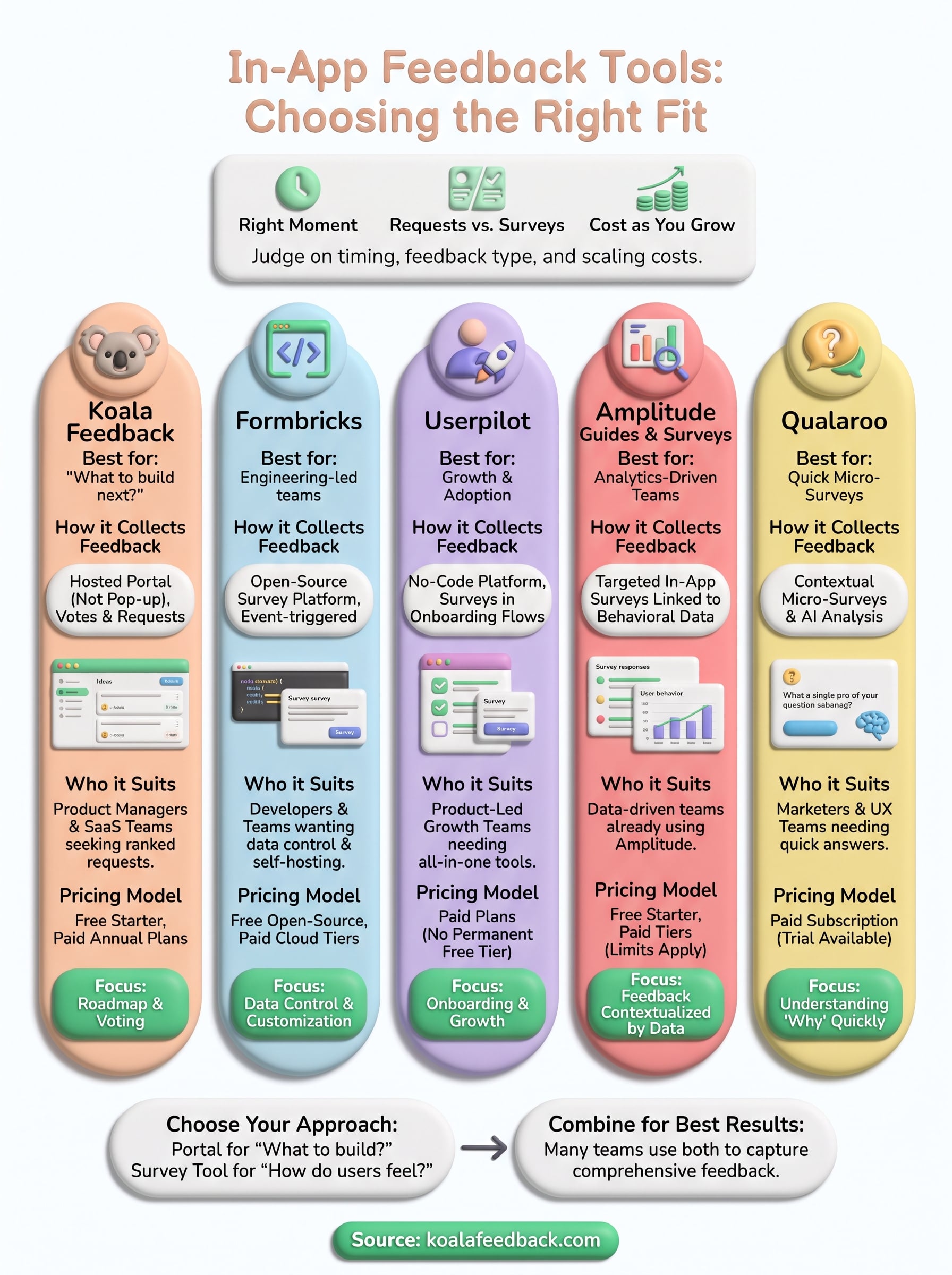
Pick by the question you need answered. If it is "what should we build?", start with a portal. If it is "how do users feel right now?", choose a survey tool such as Formbricks, Userpilot, Amplitude, or Qualaroo. Many teams end up using one of each.
Whatever you choose, ask users at the right moment and tell them what happened to their feedback. If you want a simple place to collect, rank, and show off requests, start a free Koala Feedback portal and see how it fits your product.

Start today and have your feedback portal up and running in minutes.