Good feedback for customer service and product teams is specific, tied to a real situation, and clear about the result. This article gives you six examples, each with a vague version and a strong version, so you can see the difference. Pick feature requests if you build software, outcome-based praise if you want testimonials, usability criticism if you fix friction, service feedback if you run support, pricing comments if you set plans, and cancellation reasons if you fight churn.
Most pages on this topic define feedback and stop there. That leaves you stuck if you want to know what a useful comment sounds like, what to write when a company asks for your opinion, or how to collect better answers from your own customers. "Great product" and "needs work" help nobody.
Below you will find what makes a comment worth acting on, the six examples with the questions that produce them, and a short workflow for collecting and using the results. Koala Feedback builds software for collecting and prioritizing product feedback, so that workflow is one we know well. The sample comments are illustrative, written to show patterns, not quotes from named customers.
Good customer feedback is specific, tied to a situation, and clear about the result. "Great product" is pleasant but tells the team nothing. A comment that says what you were trying to do, what happened, and what you would change gives them something to act on. The same test applies to a review, a survey answer, or a message sent straight to a company.
Every example in this article passes four checks. Use them to judge comments you receive, or to improve one you are about to write.
Feedback is useful in proportion to how much context it carries.
If you are the one leaving feedback, follow a four-part pattern: what you used the product for, what happened, how it affected you, and one suggestion. Two or three sentences are plenty. Include one good point and one improvement, because balanced comments read as credible to the company and to other buyers.
Copy this template and fill in the brackets:
I used [product or feature] to [task]. [What happened, with one concrete detail]. [Effect on you, such as time saved or a problem you hit]. One thing that would make it better: [suggestion].
Here is the template filled in for a good product: "I used the scheduling tool to book 12 client calls in one afternoon. The calendar sync worked on the first try, which saved me about an hour. One thing that would help is a reminder text for clients." That is good feedback for a product because every sentence carries a fact.
Feature request feedback tells you what customers cannot do yet. It suits software and product teams deciding what to build next.
The strongest requests describe a job to be done and what the gap costs, not only a proposed solution.
The strong version names a workflow, a frequency, and a time cost. A product manager can judge how many users share that pain and whether a Slides export or a better report template would solve it.
It also leaves room for a better answer. Customers describe problems well and designs poorly, so a comment that states the problem lets your team choose the fix.
A good feature request describes the problem and leaves the solution to the team.
Give customers one place to post ideas and vote on each other's. A feedback portal such as Koala Feedback does this: users submit ideas, vote, and comment, and the team sorts requests onto boards by product area. The free Starter plan includes 3 boards and unlimited users. Try this prompt:
What were you trying to do when you found a feature missing, and how often does that come up?
Outcome-based praise names the result a product delivered. It suits marketing teams collecting testimonials and anyone who wants strong, public proof that a product works.
Praise becomes useful when it includes a before and an after.
The strong version gives a time frame and a measurable change. A prospective buyer with a slow month-end can picture the same result, which is why specific praise persuades better than a star rating alone.
It also tells you which benefit customers value most. That is often different from the claim on your homepage, so read praise as research, not only as marketing material.
Praise becomes evidence when it includes a before and an after.
Ask right after a success moment, such as a finished first project or a hit milestone. Timing beats wording, because customers describe results most clearly while the result is fresh. Use a prompt like this:
What changed for you after you started using [product]? A number or a before and after is perfect.
Usability criticism points to the step where a customer got stuck. It suits designers and product managers fixing friction in onboarding, checkout, or settings.

Useful criticism says where the customer got lost and what they tried first.
The strong version gives a location, a search path, and a time lost. Your team can reproduce the problem in minutes, and the suggestion shows what the customer expected to find.
Negative comments like this are not a failure. They show where the product loses people, and if three customers describe the same detour, you have a clear priority.
A complaint that says where the customer got stuck is a free usability test.
Ask at the moment of friction, for example in the app after an abandoned flow or a failed task. Keep it to one question, because a frustrated customer will not fill in a long form. Try this:
Was anything confusing or harder than you expected? Tell us which step.
Customer service feedback rates one specific support interaction. It suits support leads and agents who coach their team and track quality.
Good service feedback names the person, the problem, and how it ended.
The strong version covers speed, resolution, and effort. "I didn't have to explain the problem twice" is a sign of a low-effort experience, a detail that a satisfaction score alone never captures.
Naming the agent also lets you recognize good work. Negative service feedback follows the same pattern: "I waited three days and was transferred twice" shows you exactly where the process broke.
Name the person, the problem, and how it ended.
Ask the moment a ticket closes, with a simple rating and one optional comment. Short surveys sent immediately get answers while the interaction is still fresh. Use a prompt like this:
How well did we resolve your issue today? Add a sentence on what worked or what we missed.
Pricing and value feedback shows how customers weigh what they pay against what they get. It suits founders and product owners shaping plans and packaging.
The most useful pricing comments name the limit that blocks the customer, not only the price.
The strong version is a packaging insight, not a price complaint. It tells you which limit hurts, what the customer would pay for, and which features they would drop.
Be careful about who you ask. People who stayed will tell you what they value, but people who hesitated or downgraded tell you where plans fail, so collect from both groups.
"Too expensive" is a feeling, but "this limit blocks me" is a pricing decision.
Ask when a customer hits a plan limit, views the upgrade page without upgrading, or downgrades. Link the question to the moment so the answer refers to a real decision. Try this:
What nearly stopped you from choosing this plan, and what would make it a better fit?
Cancellation feedback explains why a customer left. It suits teams fighting churn, because it exposes problems that active users have learned to live with.
Strong cancellation feedback separates the product from the experience around it.
The strong version gives one clear reason and a counterfactual. You learn the product was not the problem, onboarding was, and you learn the exact change that would have kept the account.
Customers rarely write this much on their own. A list of common reasons plus a free-text box gets you both countable data and the occasional detailed story like this one.
The customers who leave will tell you what the ones who stay have learned to live with.
Put one optional question inside the cancellation flow, before the final confirmation. Do not make it mandatory, since forced answers are usually careless. Use this prompt:
What was the main reason you are leaving? If one change would have kept you, what was it?
Collect feedback at the moment the experience happens, put it in one place, and tell customers what you did with it. The examples above work only if the question reaches the customer at the right time and the answer reaches someone who can act.
Different moments call for different channels. This table maps the six examples to when and where to ask.
| Moment | Best channel | Feedback type |
|---|---|---|
| Any time | Public feedback portal | Feature requests |
| After a milestone or result | In-app prompt or email | Outcome-based praise |
| During a stuck step | In-app prompt | Usability criticism |
| After a ticket closes | Short survey | Service feedback |
| At a plan limit or downgrade | In-app prompt | Pricing and value |
| While cancelling | Exit question | Cancellation reasons |
Collecting is the easy half. These steps keep feedback from piling up unread:
Count the themes, not the comments.
Koala Feedback handles steps one to three by deduplicating and categorizing posts automatically, with votes showing demand.
Tell customers what happened to their input, even when the answer is no. A public roadmap with statuses such as planned, in progress, and completed shows people their comments went somewhere, and it cuts repeat questions.
Koala Feedback lets you share that roadmap from a portal on your own domain, and the company says a portal can be running within minutes. Signing up is free. The Growth plan at $29 per month, billed annually, adds unlimited boards and custom statuses when you outgrow the free tier.
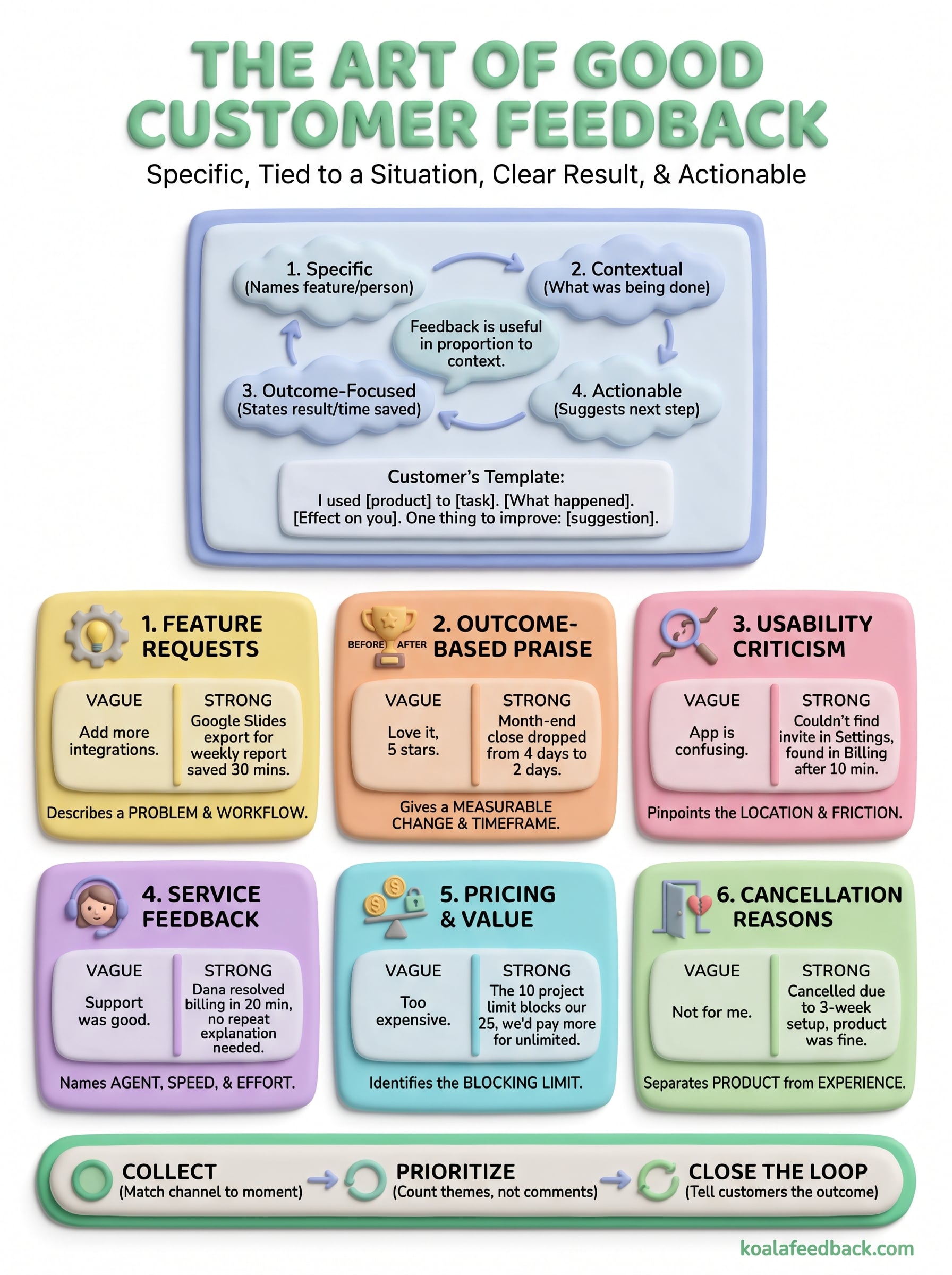
Useful feedback has the same shape in every example: a specific situation, a clear result, and a suggestion. Vague comments such as "great" or "too expensive" feel safe to write and are almost useless to read. Ask the right question at the right moment, and customers will give you the detail.
Start small. Pick the one feedback type that matters most to your team right now, add its prompt to the moment it applies, and review the answers weekly. Then tell customers what changed. If you want a ready place to collect, vote on, and publish that feedback, you can start a free feedback portal with Koala Feedback.

Start today and have your feedback portal up and running in minutes.